Filling the same forms hundreds of times is exhausting — especially for people with RSI, fatigue conditions, or neurodivergence. EasyApply Assistant remembers your answers, suggests responses, and lets you review everything before it's submitted. You stay in control.
Real screenshots showing how the assistant works alongside you on LinkedIn.
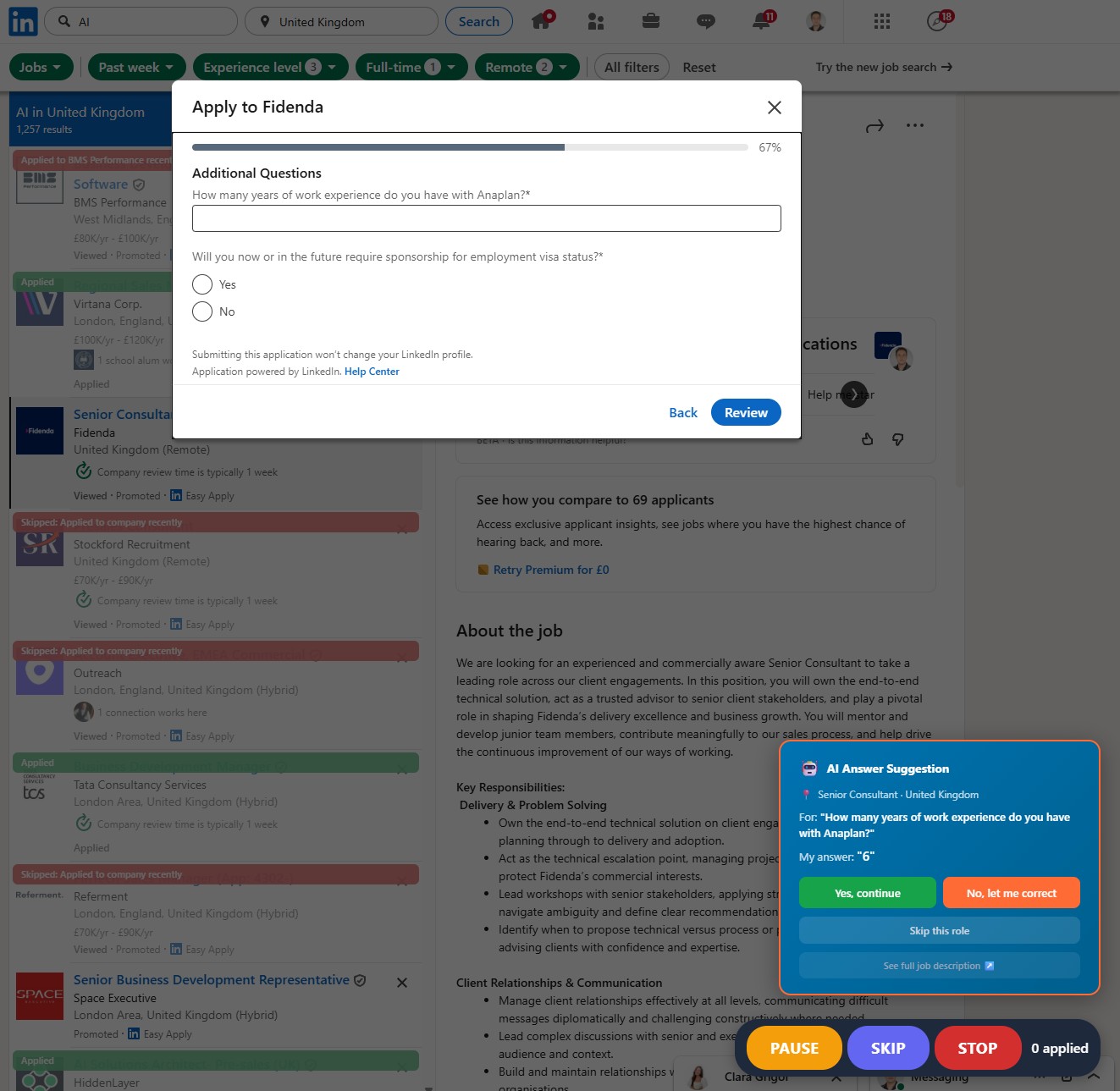
A clear balloon shows the suggested answer for each question. Accept it, edit it, or skip the role — nothing is filled in without your approval.
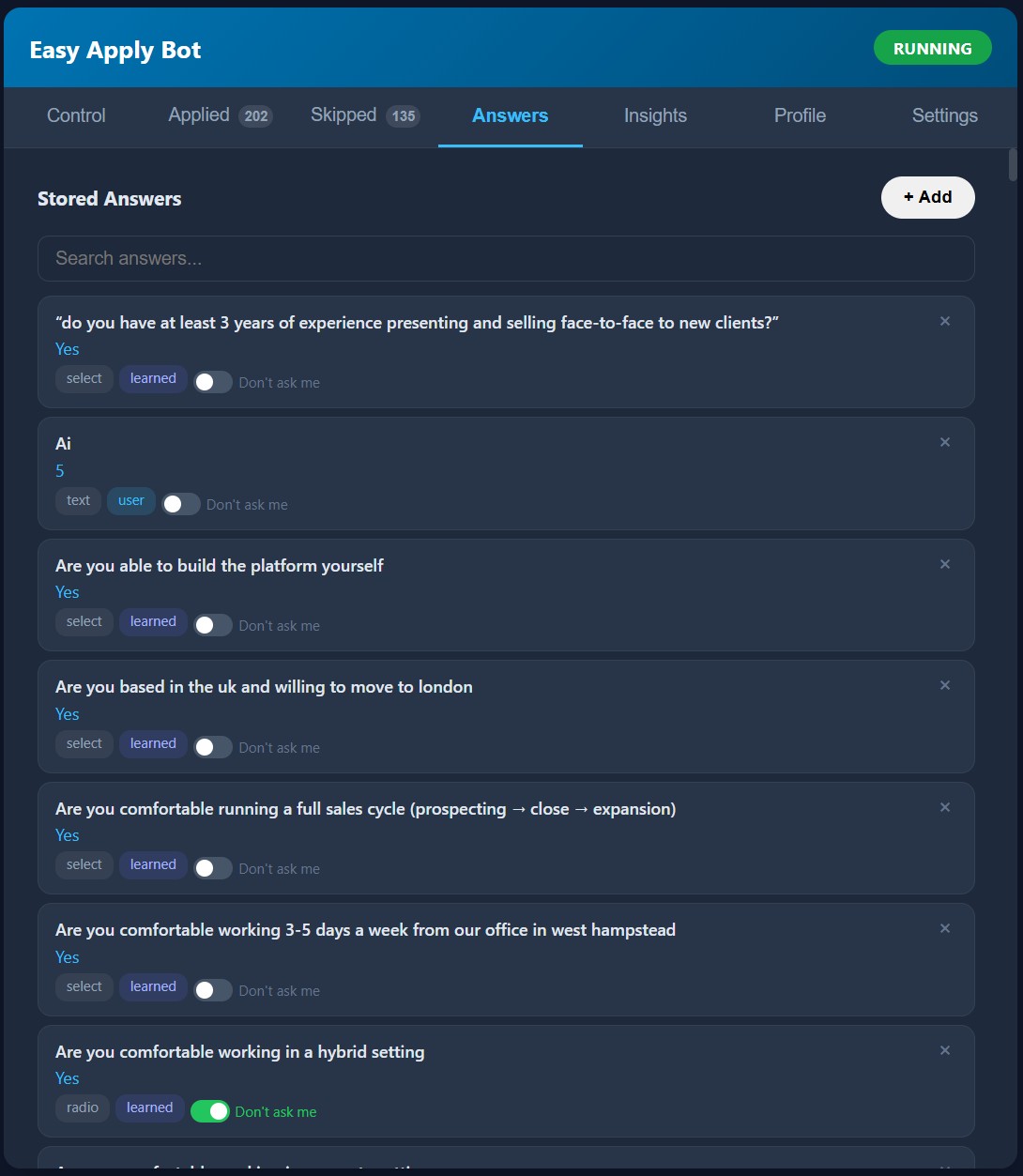
The assistant remembers and groups similar questions automatically. Toggle "Don't ask me again" on the answers that never change.
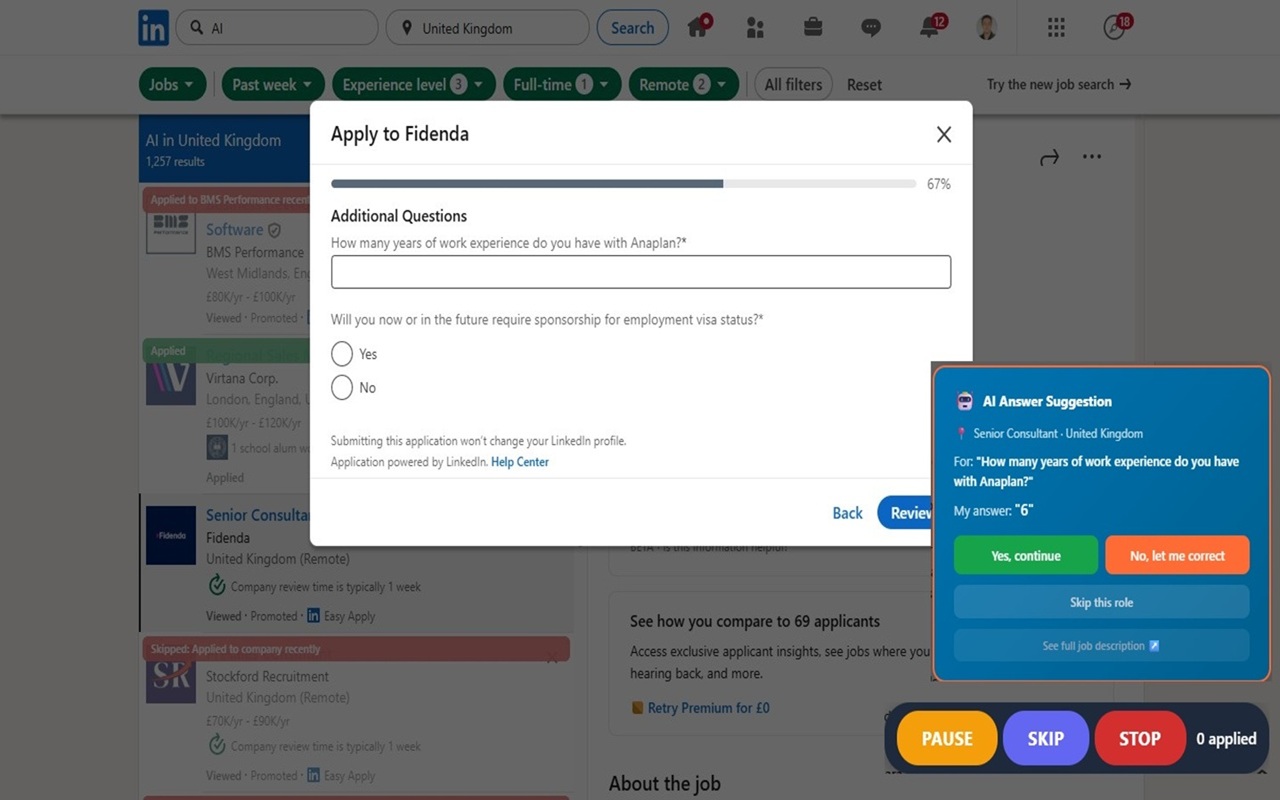
Applied roles are tagged green, skipped roles are tagged red — directly on the LinkedIn search page. You always know where you stand.
Built for people who are tired of answering the same questions hundreds of times.
Answer a question once and the assistant remembers it. Next time the same question appears, it's already filled in.
Recognises that "Are you authorized to work?" and "Do you have the right to work?" are the same question, even when worded differently.
Every answer shows a confirmation balloon before it's submitted. Edit, accept, or skip — you're always in control.
For questions the assistant hasn't seen before, it uses AI to suggest an answer. You review it before anything is filled in.
Set minimum salary, block irrelevant job titles, skip companies you've already applied to. The assistant only shows you what matters.
Your CV, your answers and your job history stay on your machine. No accounts, no ads, nothing sold or shared. Anonymous usage stats help fix bugs, and you can switch them off.
No accounts to create. No subscriptions. Just install and go.
Download from GitHub and load it into Chrome. Takes 30 seconds.
Import your LinkedIn profile. Your name, email, and phone are auto-filled from now on.
Go to LinkedIn, search for jobs with Easy Apply filter, and paste the URL.
The assistant fills forms while you confirm each answer. After a few jobs, most answers are automatic.
The assistant never submits anything without your approval. Each question shows a clear confirmation balloon with the suggested answer.
No. EasyApply Assistant is designed as an assisted browsing tool, not an autopilot. Every answer is shown to you in a confirmation balloon before it's filled in. You can accept, edit, or reject each one. You can skip any job at any time. Nothing is ever submitted without your explicit approval.
Once you've reviewed and confirmed an answer a few times, you can toggle "Don't ask me" on that specific answer to auto-fill it in future — but that's always your choice, and you can turn it off again at any time.
The Free plan is free for ever: up to 10 applications a day, with AI answers to application questions included. You don't need an API key or any other account.
Pro is £9.99 a month for up to 50 applications a day, more AI answers, tailored cover letters and career reports. Cancel any time. See Plans.
Your profile, your contact details, your stored answers and your job history are kept in Chrome's local storage on your own computer. There is nothing to sign up for, and nothing is ever sold.
To run the plans, we store your LinkedIn account number and profile address, the times of your setups and applications, and how many AI answers you used each day.
The assistant does send anonymous usage statistics — a random installation number, which version and operating system you're on, your country, and which features you used. That's how we find out what's broken. It contains nothing that identifies you, not even your IP address, and you can turn it off in Settings. There's also a separate, entirely optional setting for sharing your profile and applications to help improve the suggestions; it's off unless you switch it on.
When the AI suggests an answer, the question, your profile text and the job's details pass through our servers to Claude AI (Anthropic). We don't store any of it.
Full detail is in the Privacy Policy, including how to delete everything we hold with one button.
It keeps working. The assistant still remembers your answers, groups similar questions, and auto-fills stored responses. For a brand new question it shows a blank field for you to type the answer, and remembers it for next time. Your AI answers come back the next day.
The AI is a convenience, not a requirement. Most users find that after 10-15 applications, the assistant has learned enough answers to handle the majority of questions without AI.
When the assistant encounters a new question, it first checks its stored answers for similar questions (using smart grouping that recognises different wordings of the same question). If no match is found, it asks the AI for a suggestion.
Either way, the answer is always shown to you in a confirmation balloon. You review it, edit it if needed, and confirm. The assistant then remembers your response for next time.
Yes. You have several filters available in the Settings tab:
Title blocklist — add keywords like "intern", "healthcare", or "junior" to automatically skip jobs with those words in the title.
Minimum salary — set a floor (e.g. 70,000) and jobs with a listed salary below that are skipped. Jobs without a salary listed are not affected.
Recent company filter — avoid applying to the same company twice within a set number of days.
You can also skip any individual job manually with the Skip button at any time during the process.
Yes. In the Settings tab, check "I need visa sponsorship to work in the UK" and click "Save & Apply Work Authorization Answers". The assistant will correctly answer "Yes" to sponsorship questions while still confirming you're authorized to work (assuming you have a current visa).
Sponsorship questions and work authorization questions are kept separate, so "Do you need sponsorship?" and "Are you authorized to work?" can have different answers — which is exactly the case for visa holders.
Every answer is shown to you before it's submitted, so you always have the chance to correct it. If you spot a wrong answer, click "No, let me correct" on the confirmation balloon and type the right one. The assistant saves your correction and uses it for future applications.
You can also go to the Answers tab at any time to review, edit, or delete any stored answer.
Currently, LinkedIn Easy Apply is fully supported. This covers the vast majority of one-click job applications. Indeed support is in development and will be available in a future release. We plan to expand to more platforms over time.
Yes. EasyApply Assistant is a Chrome extension, so it works on any operating system that runs Google Chrome — Windows, macOS, Linux, and Chromebooks.
More questions? Read the Help page for step-by-step guides, including how to buy, manage or cancel Pro.
Whether you're managing a disability, dealing with fatigue, or simply tired of repetitive forms — EasyApply Assistant gives you back your time. Free, open source, and private by design.